
Kore.ai: Agent Marketplace
Kore.ai: Agent Marketplace
Designing the PLG front door for enterprise AI
Designing the PLG front door for enterprise AI
Role
Product Designer
Skills
Product Design, Product Strategy ,Prototyping
Overview
Overview
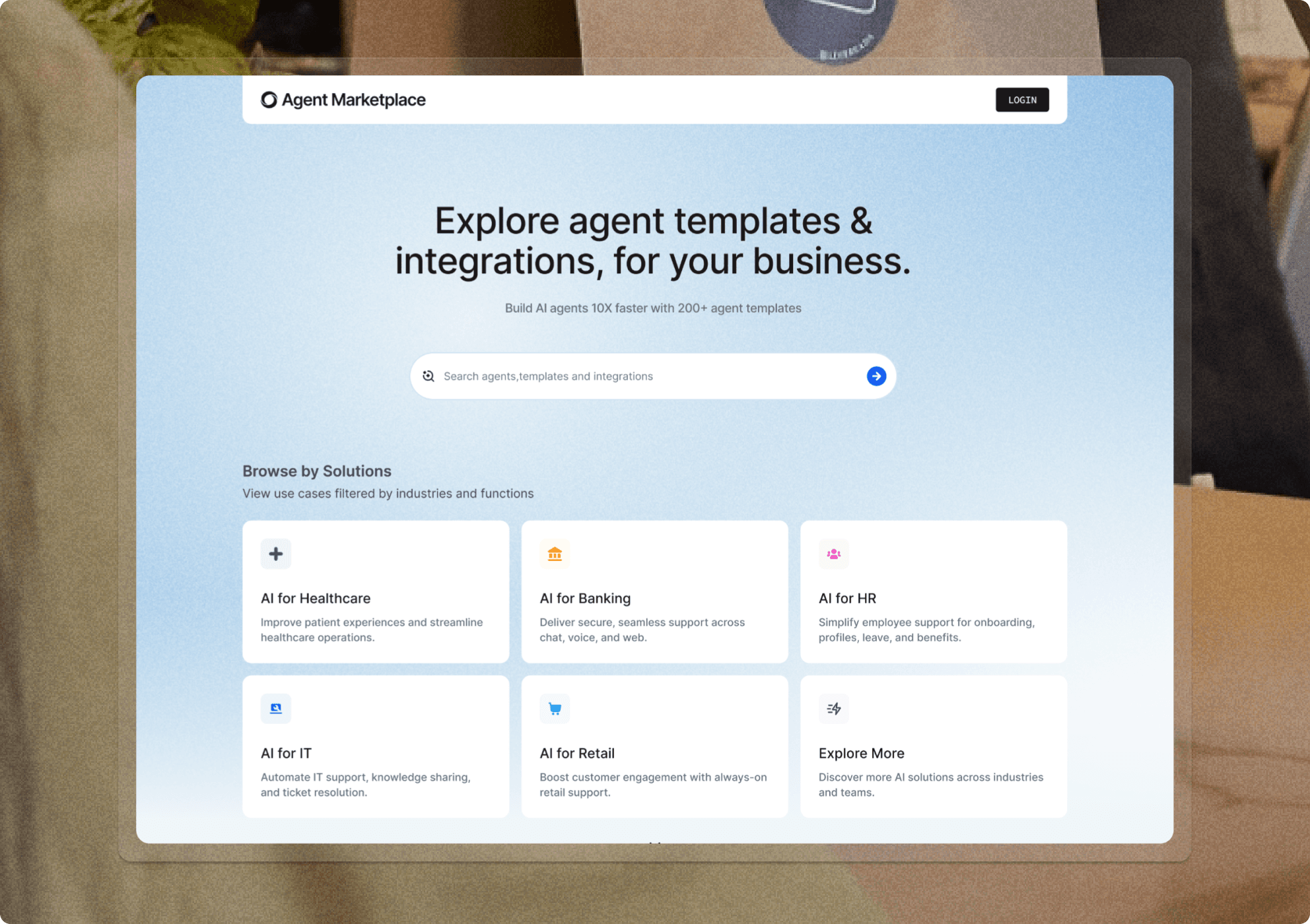
The Kore.ai Agent Marketplace is the discovery and deployment layer of the Kore.ai Agent Platform — the place where enterprise teams go to find, evaluate, and install pre-built AI agents across Customer Service, Sales, HR, and IT. With 200+ agent templates and integrations with 150+ business apps, it was built to make enterprise AI feel immediately accessible rather than months away.
The Kore.ai Agent Marketplace became the product-led entry point for the Kore.ai Agent Platform — helping enterprise teams discover, preview, and deploy AI agents by use case instead of navigating separate product lines. With 200+ templates and 150+ integrations, the marketplace helped reposition Kore.ai around solutions, making enterprise AI feel immediately usable rather than months away.
The Kore.ai Agent Marketplace is the discovery and deployment layer of the Kore.ai Agent Platform — the place where enterprise teams go to find, evaluate, and install pre-built AI agents across Customer Service, Sales, HR, and IT. With 200+ agent templates and integrations with 150+ business apps, it was built to make enterprise AI feel immediately accessible rather than months away.
I was brought in as the only designer to build the marketplace from the ground up. No existing design language, no prior UX framework — just a product vision and a set of engineering constraints. I owned everything: persona research, information architecture, agent card design, installation flows, and the component library that shipped with the product.
I was brought in as the only designer to build the marketplace from the ground up. No existing design language, no prior UX framework — just a product vision and a set of engineering constraints. I owned everything: persona research, information architecture, agent card design, installation flows, and the component library that shipped with the product.
The Challenge
The Challenge
Enterprise teams needed a faster way to understand what Kore.ai could solve for them. The challenge was to turn a complex AI platform into a solution-led journey that worked for business users, sales teams, and IT admins.
Enterprise teams needed a faster way to understand what Kore.ai could solve for them. The challenge was to turn a complex AI platform into a solution-led journey that worked for business users, sales teams, and IT admins.
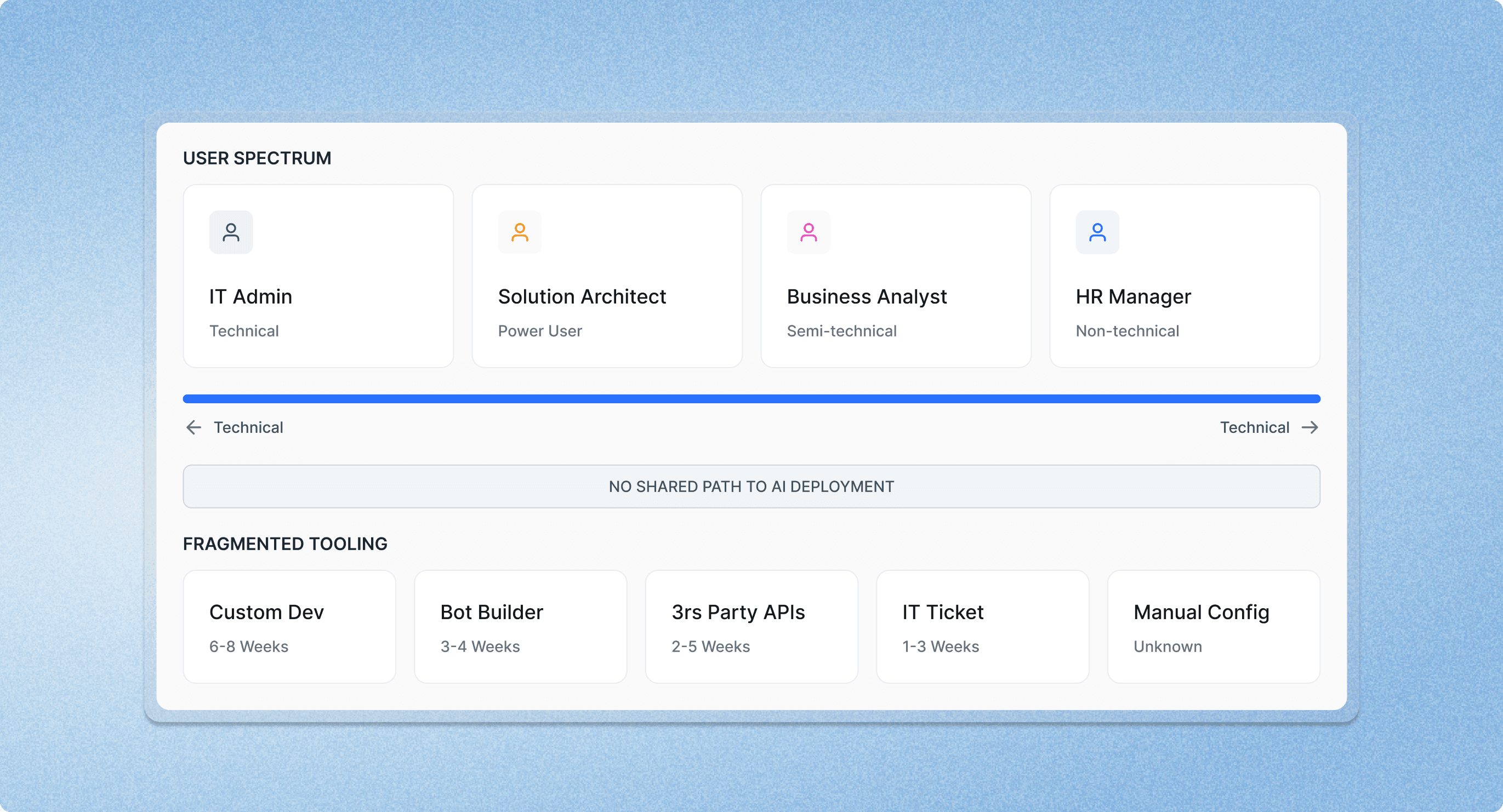
Before the marketplace existed, deploying an AI agent at an enterprise required weeks of configuration by a developer. Non-technical users couldn't get started without IT involvement. The problem wasn't awareness — teams knew they wanted AI. The problem was the gap between wanting it and having it running.
Before the marketplace existed, deploying an AI agent at an enterprise required weeks of configuration by a developer. Non-technical users couldn't get started without IT involvement. The problem wasn't awareness — teams knew they wanted AI. The problem was the gap between wanting it and having it running.
iBuilding a custom agent from scratch took weeks of engineering effort
Non-technical users (HR, Sales, Customer Service) had no self-serve path to AI deployment
IT admins needed enterprise-grade configurability — but the same UI had to work for a business analyst
No shared language existed for what an 'AI agent' could or should do in their context
iBuilding a custom agent from scratch took weeks of engineering effort
Non-technical users (HR, Sales, Customer Service) had no self-serve path to AI deployment
IT admins needed enterprise-grade configurability — but the same UI had to work for a business analyst
No shared language existed for what an 'AI agent' could or should do in their context
The core design tension: a marketplace that feels simple enough for a non-technical HR manager to navigate alone, but deep enough that a solution architect trusts it with enterprise-grade deployment.
The core design tension: a marketplace that feels simple enough for a non-technical HR manager to navigate alone, but deep enough that a solution architect trusts it with enterprise-grade deployment.
User Research
User Research
The real friction wasn't finding agents — it was trusting them enough to install.
The real friction wasn't finding agents — it was trusting them enough to install.
Key User Insights
Key User Insights
Four Enterprise Buyer Personas
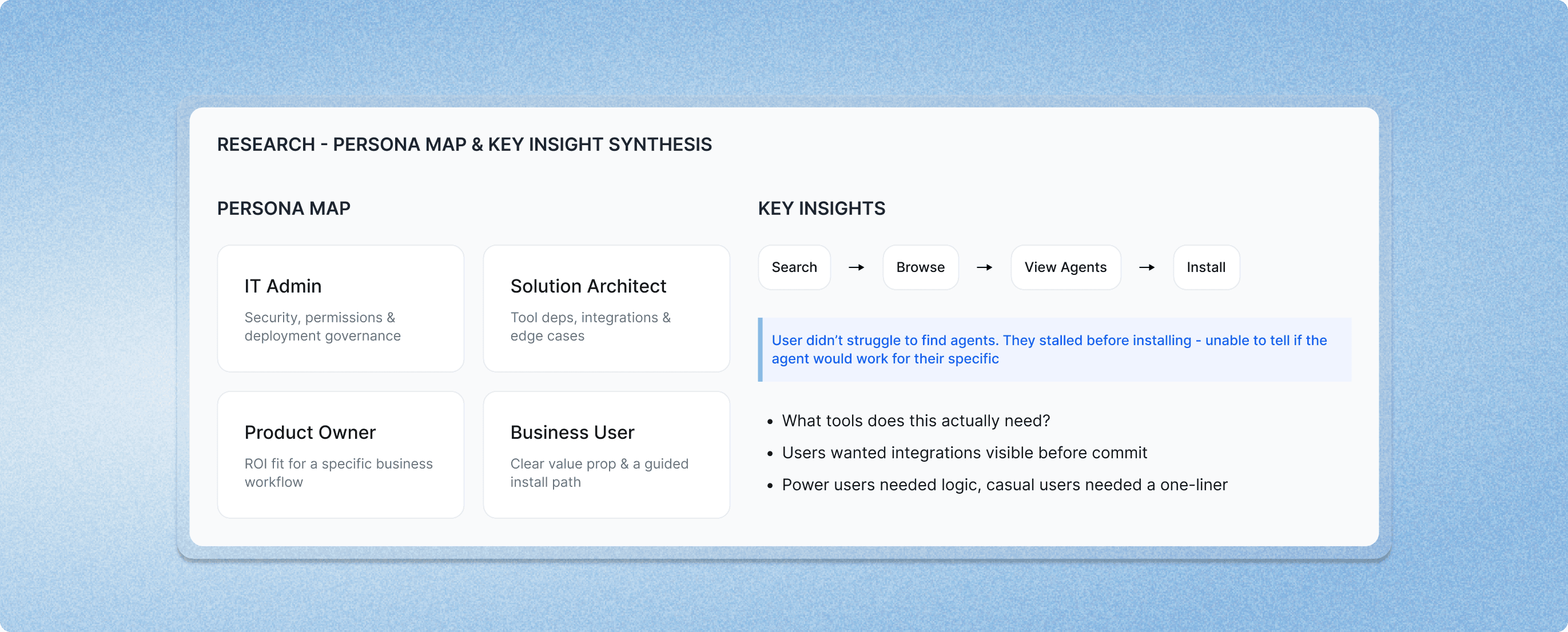
Through stakeholder interviews and internal session reviews, I mapped four distinct user types:
The IT Admin — focused on security, permissions, and deployment governance
Through stakeholder interviews and internal session reviews, I mapped four distinct user types:
The IT Admin — focused on security, permissions, and deployment governance
The Solution Architect — wants to inspect under the hood: tool dependencies, integration requirements, edge case handling
The Product Owner — evaluating ROI and fit for a specific business workflow
The Business User — non-technical; needs a clear value prop and a guided install path
The Solution Architect — wants to inspect under the hood: tool dependencies, integration requirements, edge case handling
The Product Owner — evaluating ROI and fit for a specific business workflow
The Business User — non-technical; needs a clear value prop and a guided install path
The Core Insight
I expected discovery to be the hardest problem. It wasn't. Users found agents quickly using search and category filters. The real drop-off happened before install: users couldn't tell whether an agent would work for their specific context.
I expected discovery to be the hardest problem. It wasn't. Users found agents quickly using search and category filters. The real drop-off happened before install: users couldn't tell whether an agent would work for their specific context.
What tools does this actually need?" was the most common pre-install question
Users wanted to see integrations before committing — not after
Template descriptions were too generic to drive confidence
Power users wanted to inspect agent logic; casual users needed a one-liner
What tools does this actually need?" was the most common pre-install question
Users wanted to see integrations before committing — not after
Template descriptions were too generic to drive confidence
Power users wanted to inspect agent logic; casual users needed a one-liner
This reframed the entire design priority. The marketplace wasn't a search problem. It was a confidence problem. Every design decision from that point forward was oriented around answering: “will this work for me?” — before anyone clicked install.
This reframed the entire design priority. The marketplace wasn't a search problem. It was a confidence problem. Every design decision from that point forward was oriented around answering: “will this work for me?” — before anyone clicked install.
Design Strategy
Design Strategy
I shaped the marketplace around two PLG principles:
I shaped the marketplace around two PLG principles:
Preview Before Commitment
Every agent card and detail view had to answer “will this work for me?” before the user reached the install button. That meant:
Every agent card and detail view had to answer “will this work for me?” before the user reached the install button. That meant:
Surface integration requirements upfront — not buried in setup
Show use-case context, not just feature lists
Provide a template preview so users can inspect what they're deploying
Make the agent's tool dependencies scannable in under 10 seconds
Surface integration requirements upfront — not buried in setup
Show use-case context, not just feature lists
Provide a template preview so users can inspect what they're deploying
Make the agent's tool dependencies scannable in under 10 seconds
The Core Insight
The same interface had to serve a business analyst and a solution architect. Rather than designing two experiences, I designed one with progressive depth:
The same interface had to serve a business analyst and a solution architect. Rather than designing two experiences, I designed one with progressive depth:
Default view: one-click install with sensible defaults
Expandable detail: tool configuration, knowledge base connection, permission scoping
Advanced mode: full agent logic inspection and customization
No step in the flow required technical knowledge unless the user chose to go deeper
Default view: one-click install with sensible defaults
Expandable detail: tool configuration, knowledge base connection, permission scoping
Advanced mode: full agent logic inspection and customization
No step in the flow required technical knowledge unless the user chose to go deeper
Progressive complexity isn't about hiding features — it's about sequencing them. The install flow was designed so a non-technical user could complete it without encountering a single field they didn't understand, while a power user always had a path to go deeper.
Progressive complexity isn't about hiding features — it's about sequencing them. The install flow was designed so a non-technical user could complete it without encountering a single field they didn't understand, while a power user always had a path to go deeper.
Core Experience
Core Experience
From browse to deployed — the full marketplace flow, designed for confidence at every step.
From browse to deployed — the full marketplace flow, designed for confidence at every step.
Agent Marketplace Landing page
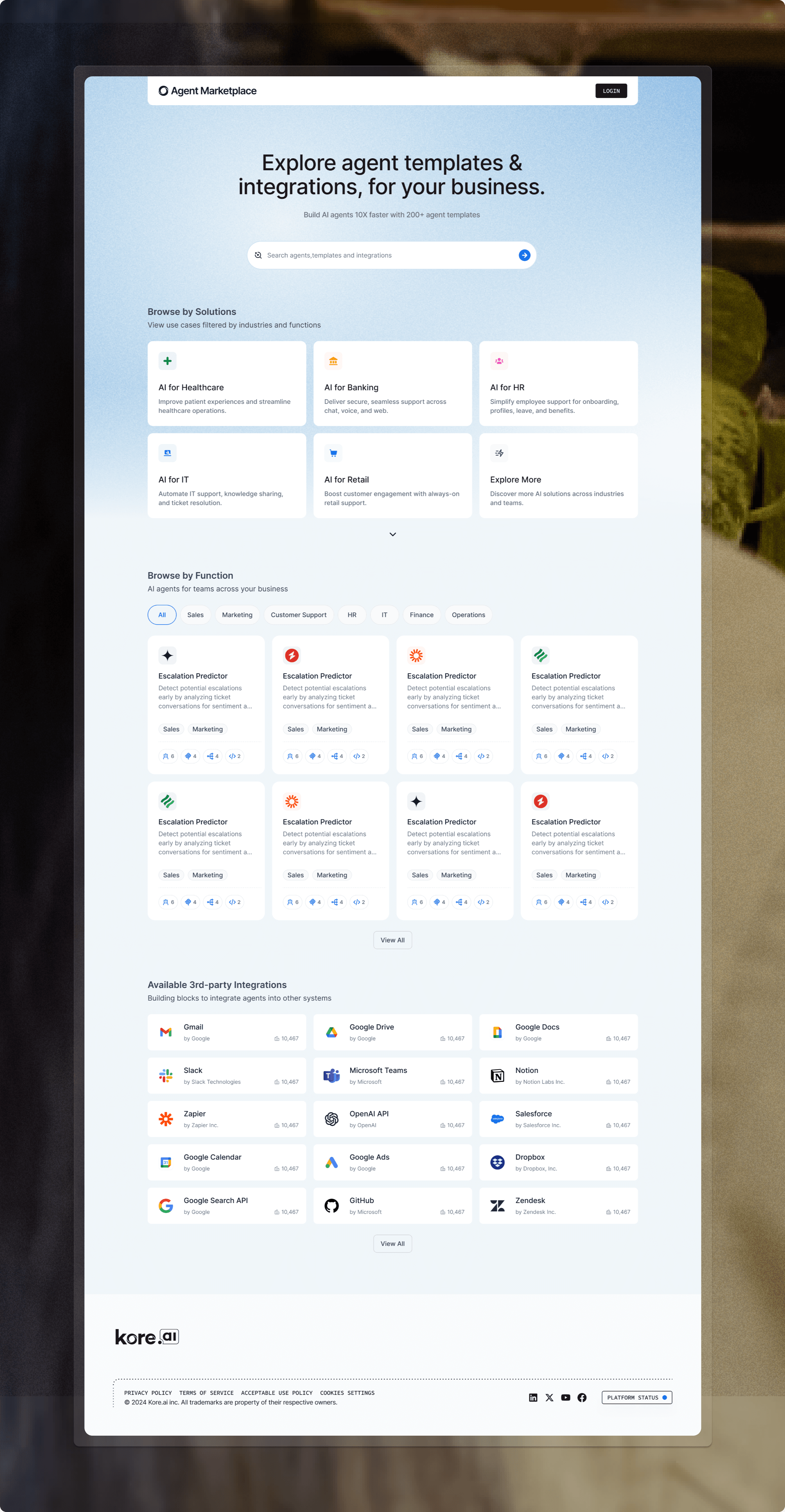
The landing experience orients teams around what they can do next: explore categories, search by problem space, and move quickly into evaluation without hunting through internal docs.
The landing experience orients teams around what they can do next: explore categories, search by problem space, and move quickly into evaluation without hunting through internal docs.
Browse, Search & Filter
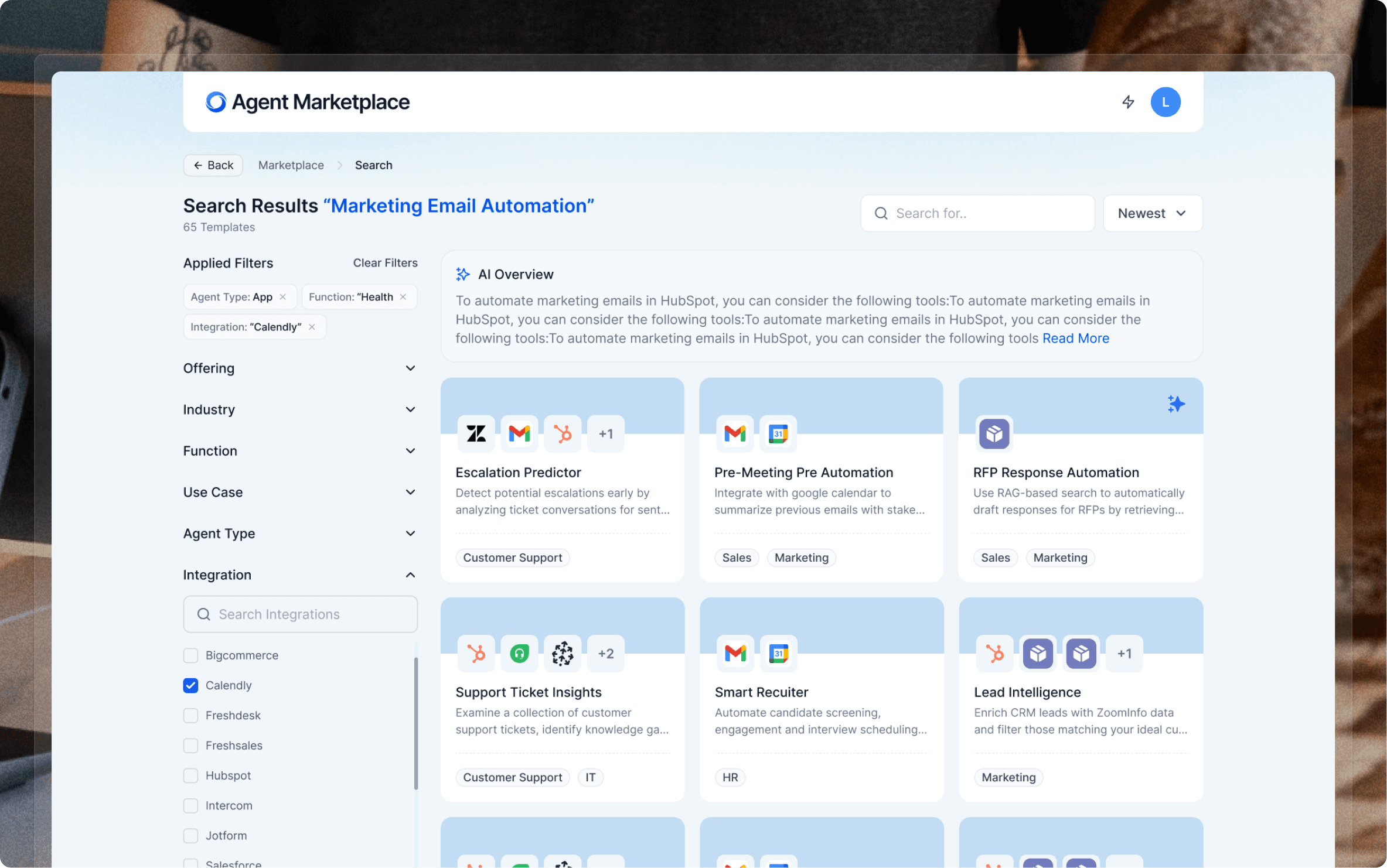
The browse layer combined category navigation (Customer Service, Sales, HR, IT), keyword search, and integration filters — letting users find relevant agents across 200+ templates without scrolling through noise. The “New” and “Featured” tags created editorial curation without requiring a separate editorial system.
The browse layer combined category navigation (Customer Service, Sales, HR, IT), keyword search, and integration filters — letting users find relevant agents across 200+ templates without scrolling through noise. The “New” and “Featured” tags created editorial curation without requiring a separate editorial system.
Agent Card System
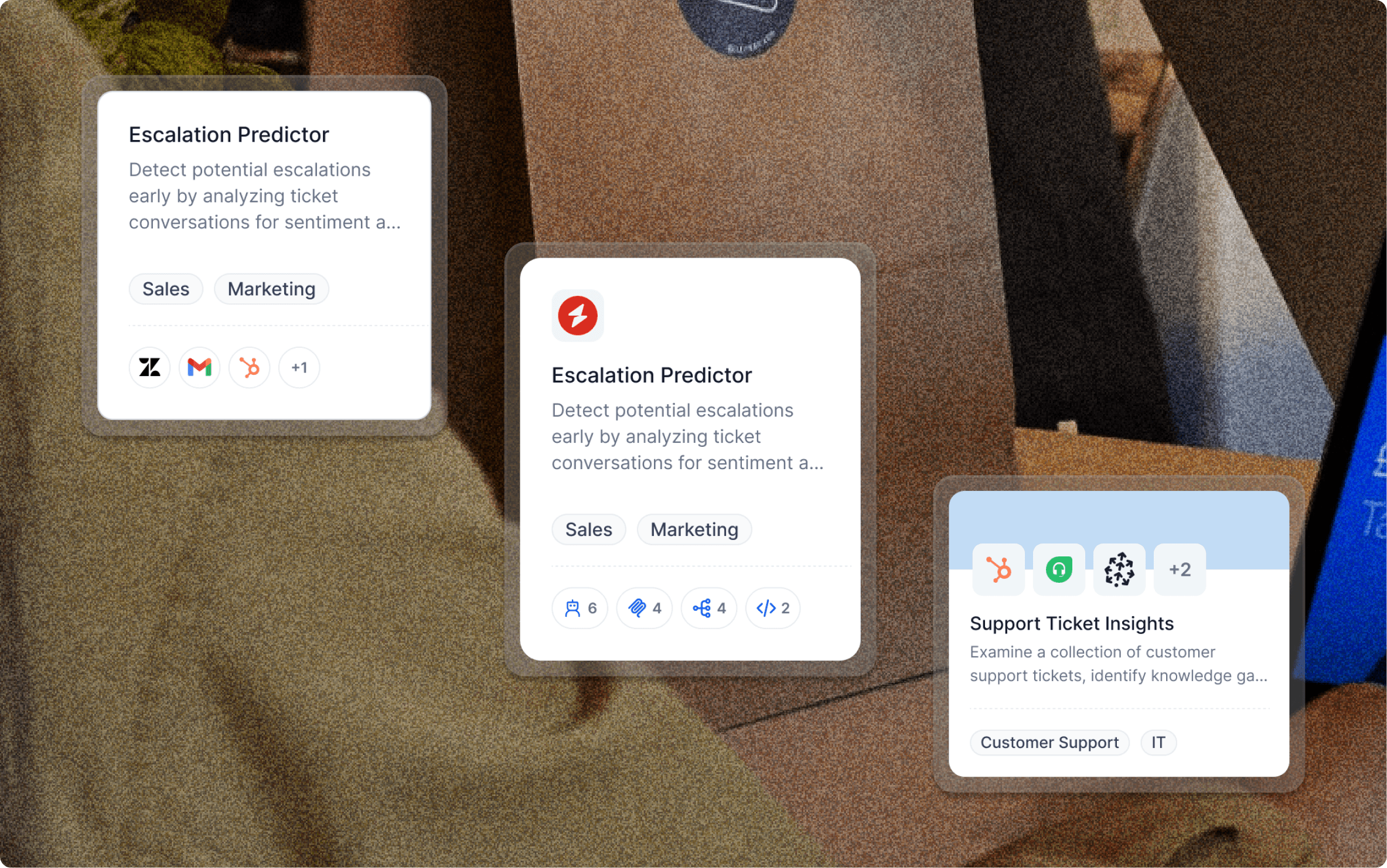
The agent card is the atomic unit of the entire marketplace. Every card had to communicate function, context, and compatibility at a glance — without overwhelming users or dumbing down for power users.
The agent card is the atomic unit of the entire marketplace. Every card had to communicate function, context, and compatibility at a glance — without overwhelming users or dumbing down for power users.
Card Anatomy
Category tag — scannable domain label (HR, Sales, IT)
Agent type badge — Agentic App vs. Agent App
One-liner value prop — what the agent does, in plain language
Integration chips — the apps it connects to, surfaced immediately
Use-case tags — who it's for and when to use it
Category tag — scannable domain label (HR, Sales, IT)
Agent type badge — Agentic App vs. Agent App
One-liner value prop — what the agent does, in plain language
Integration chips — the apps it connects to, surfaced immediately
Use-case tags — who it's for and when to use it
Template Page
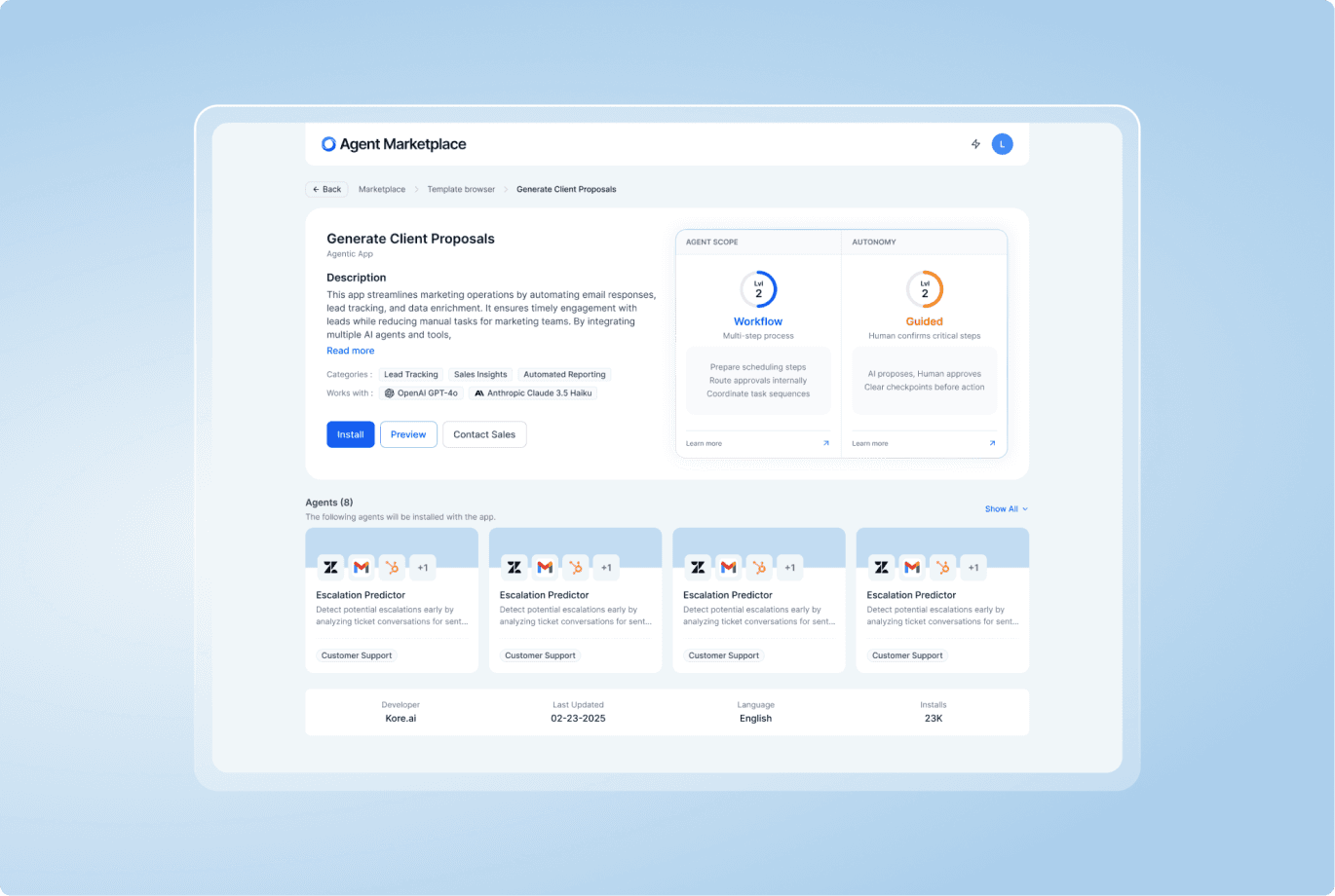
The template view is where confidence turns into commitment: users can read the one-liner, inspect Agent Scope and Autonomy, see which sub-agents will be installed, and check how many teams have already deployed it — before touching install.
The template view is where confidence turns into commitment: users can read the one-liner, inspect Agent Scope and Autonomy, see which sub-agents will be installed, and check how many teams have already deployed it — before touching install.
Template Preview
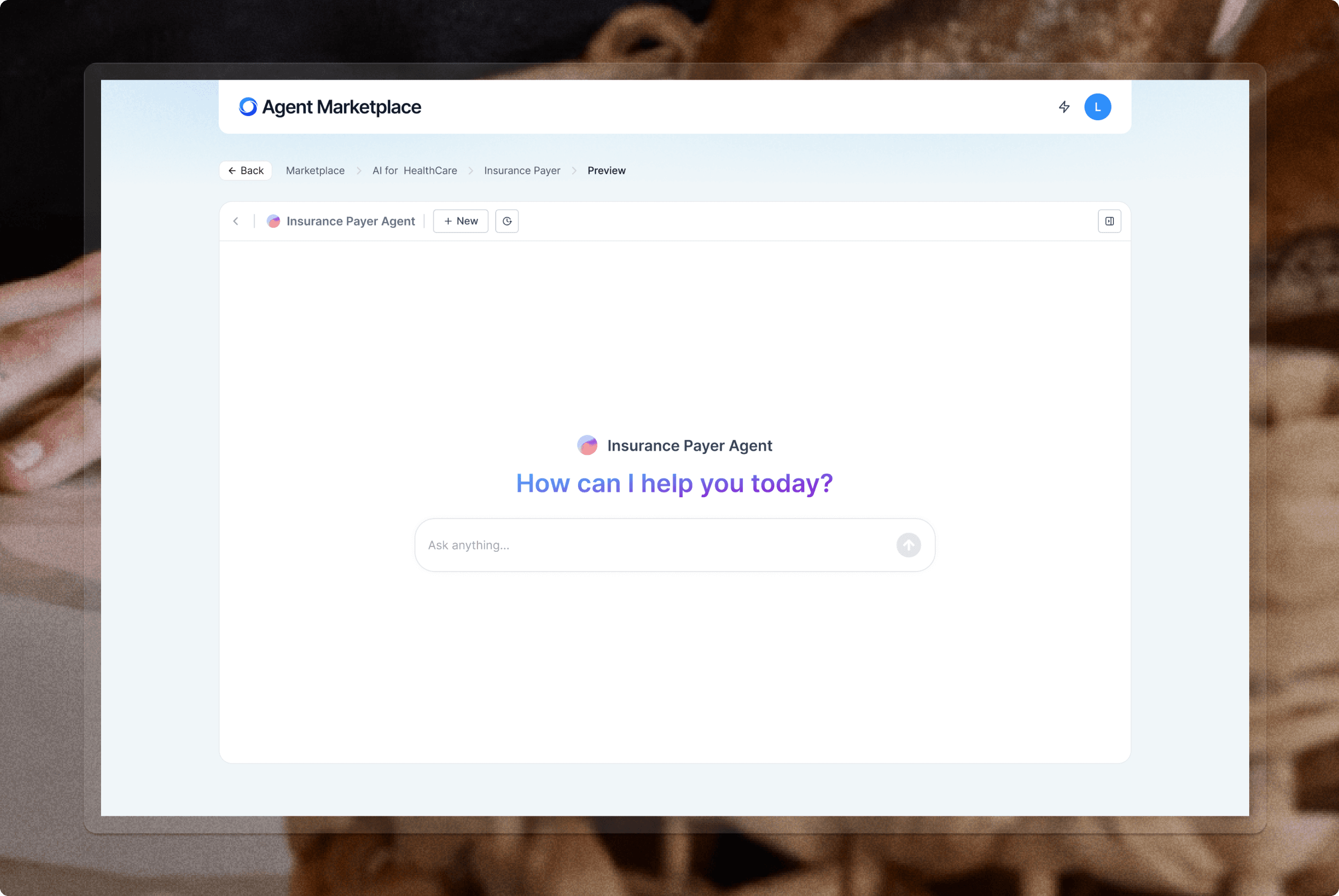
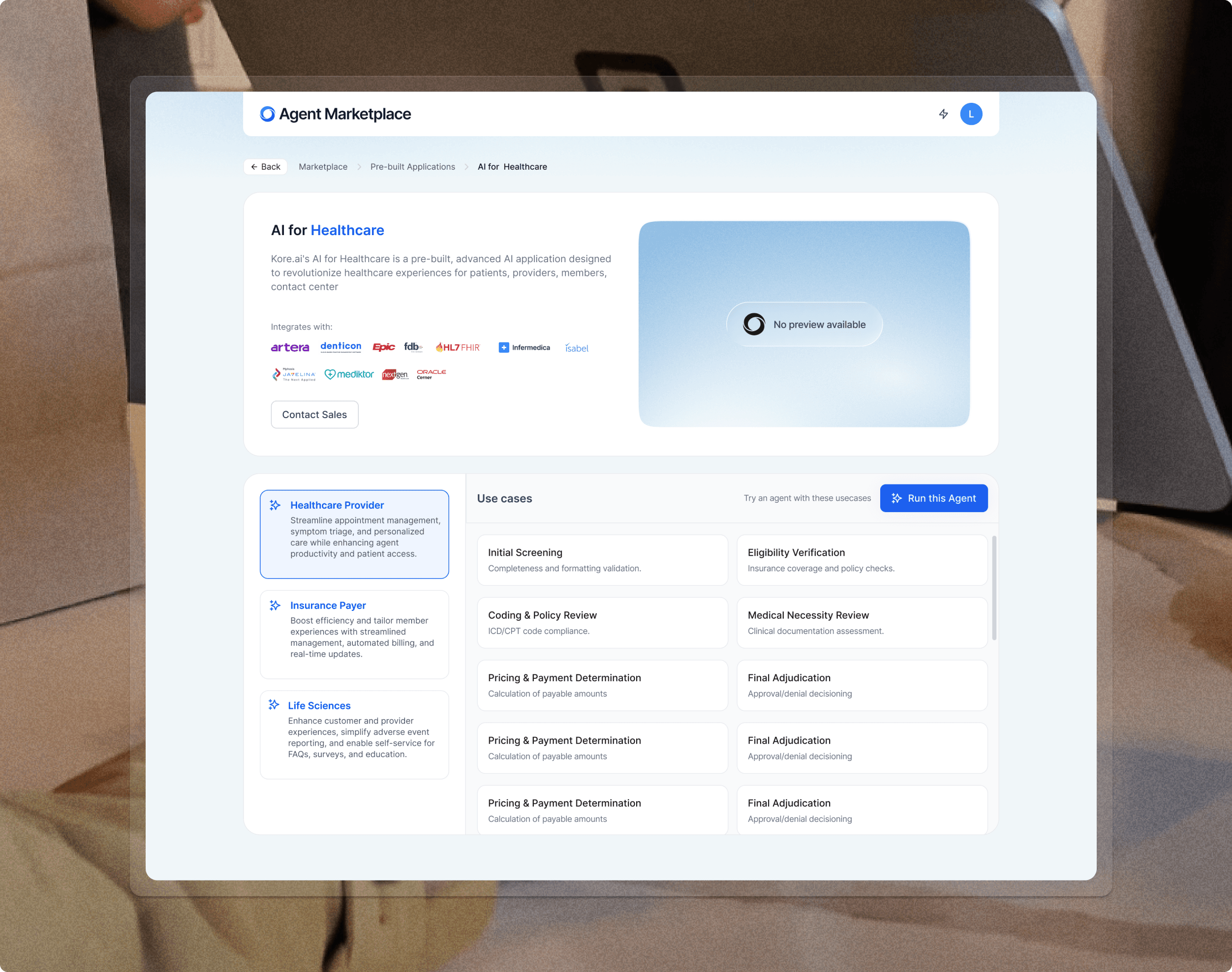
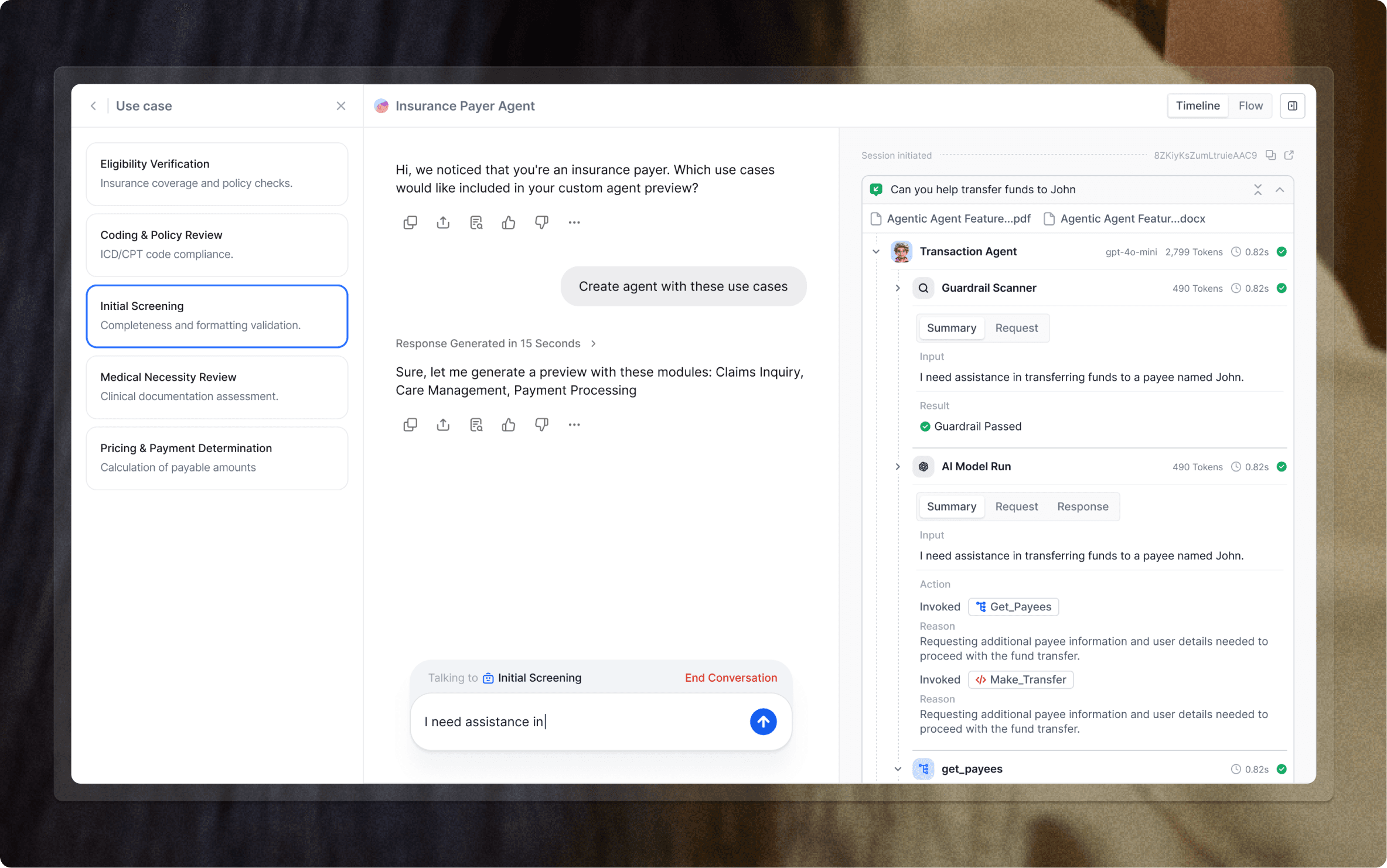
To support the PLG journey, I designed a template preview experience where users and sales teams could demonstrate an agent before installation. The preview surfaced the agent’s use case, required integrations, sample workflows, and reasoning behavior, helping customers understand value before touching production data.
This turned the marketplace from a static catalog into a guided evaluation surface: customers could explore faster, sales could demo with more confidence, and teams could move from interest to deployment with fewer unknowns.
The template preview resolved the single biggest drop-off point discovered in research. Users who previewed an agent before installing converted at a significantly higher rate than those who went straight to the install flow.
Previewing AI solutions before onboarding
I designed this prebuilt solution preview so customers could understand the value of AI for Healthcare before going through full platform onboarding.
Sales teams used it as a pitch-ready experience: prospects could explore healthcare use cases, review integrations, and preview how an agent reasons in real time. This helped the marketplace work as both a PLG entry point and a sales enablement tool.
Integration page
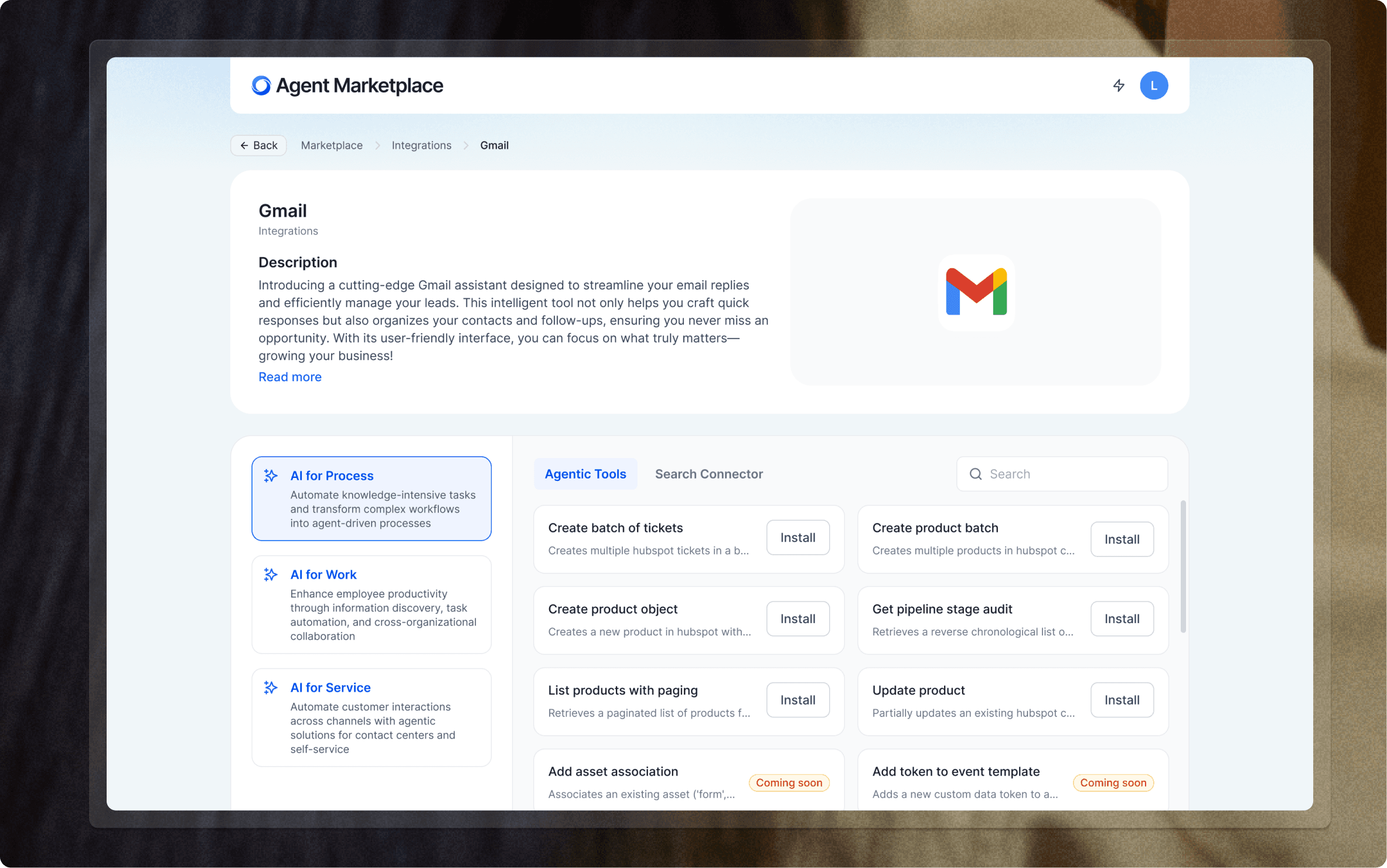
Each integration has its own detail view that surfaces exactly what the agent can do with that tool — broken down by capability group (AI for Process, AI for Work, AI for Service) and individual actions. Users see what they're granting access to, not just a generic permission screen.
Each integration has its own detail view that surfaces exactly what the agent can do with that tool — broken down by capability group (AI for Process, AI for Work, AI for Service) and individual actions. Users see what they're granting access to, not just a generic permission screen.
Key design decisions
Tool actions listed by capability group — not a flat permission dump
•"Coming soon" tags set expectations without blocking install
•Search connector vs. agentic tools split makes power vs. basic use clear
•One-click install per action reduces the friction of progressive tool adoption
Installation flow
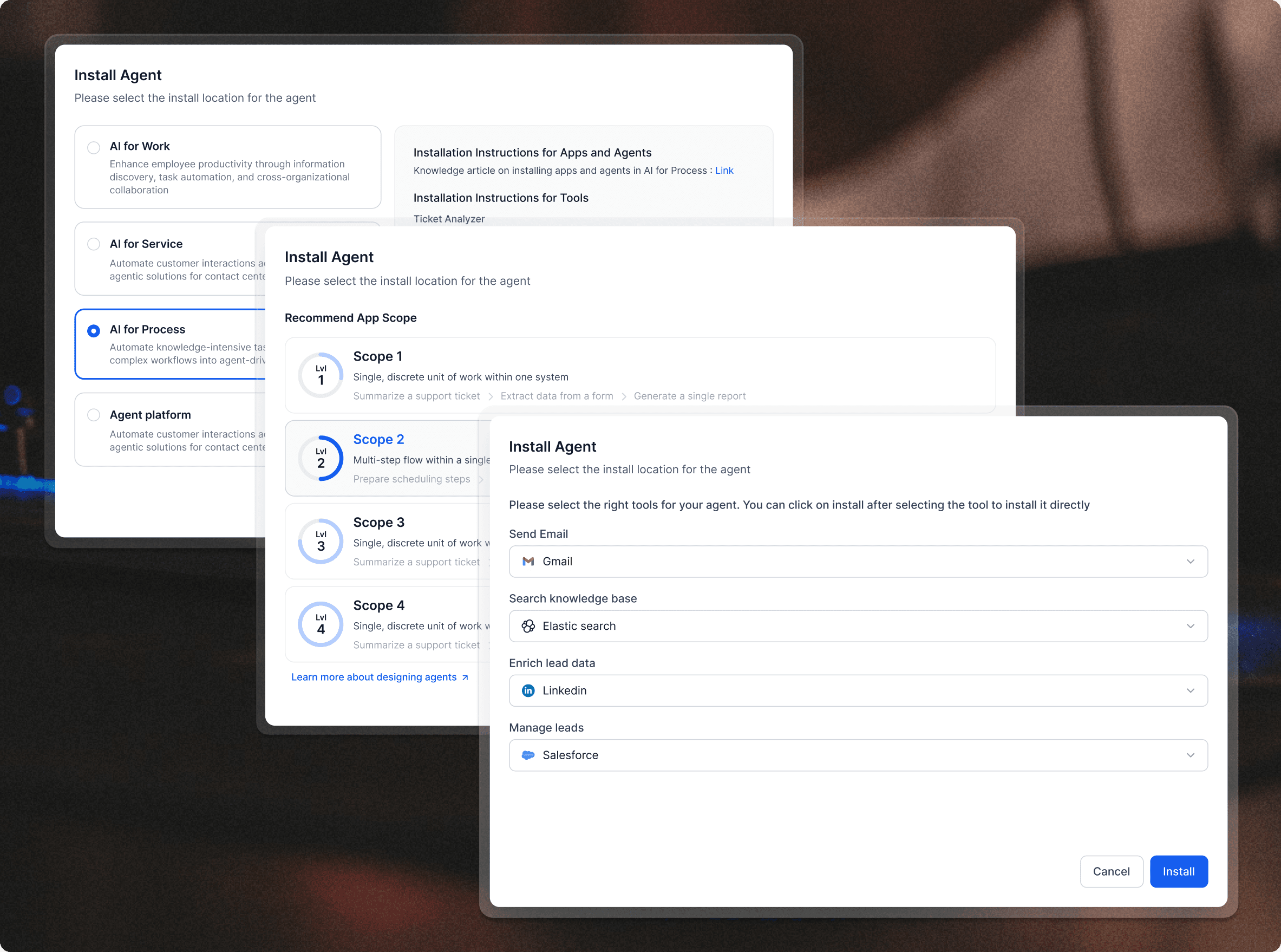
The install flow was the highest-stakes UX in the product. It needed to collapse weeks of developer configuration into a guided 15-minute experience, without hiding complexity that power users needed.
The install flow was the highest-stakes UX in the product. It needed to collapse weeks of developer configuration into a guided 15-minute experience, without hiding complexity that power users needed.
Install Steps
Step 1: Select deployment target — AI for Work, Service, or Process
•Step 2: Choose scope — from single discrete task (Scope 1) to multi-step workflow (Scope 4)
•Step 3: Connect tools — Gmail, Elasticsearch, LinkedIn, Salesforce; one-click install per integration
Private Marketplace: making PLG work for enterprise
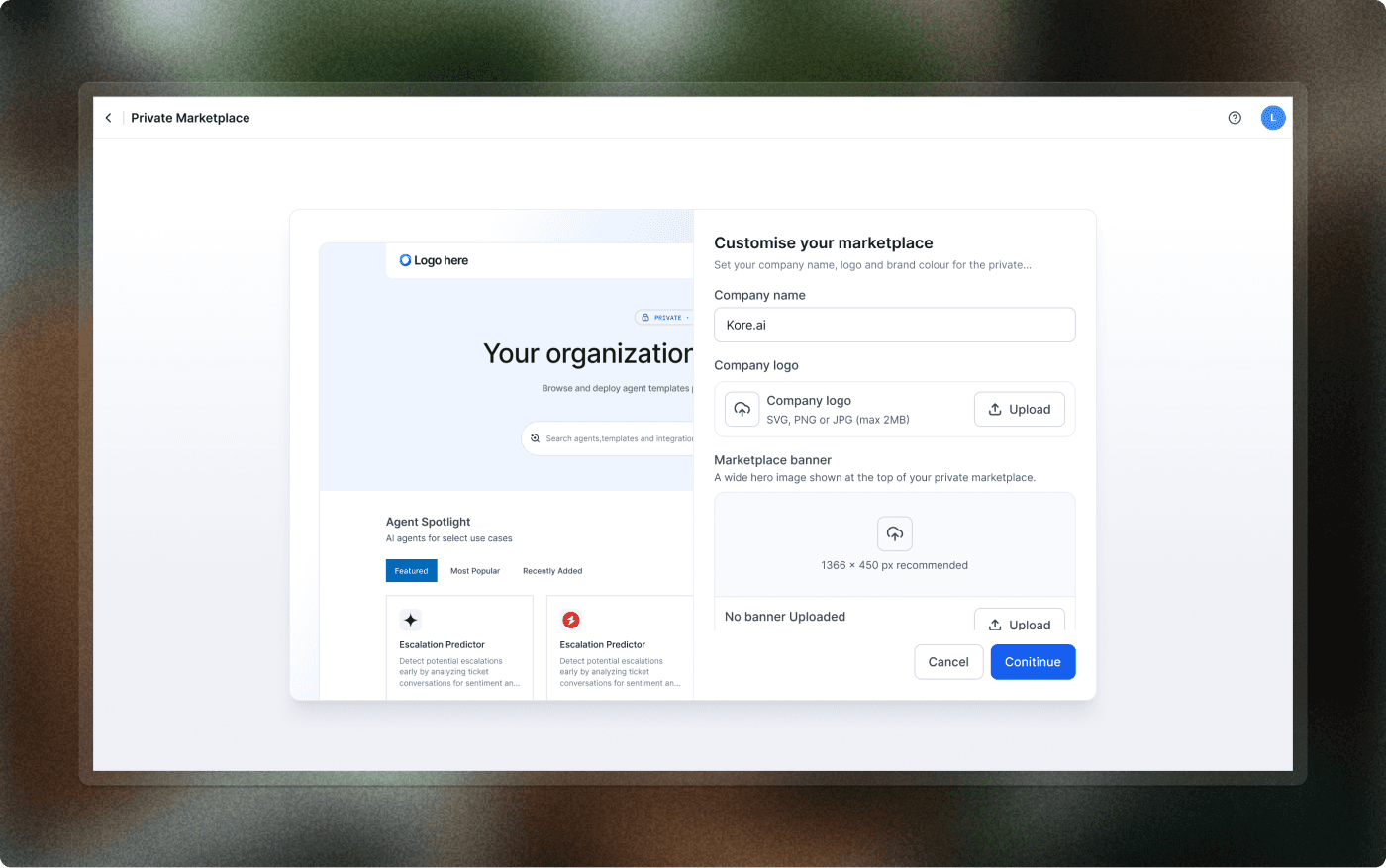
For enterprise customers, the public marketplace was only part of the journey. IT and platform teams needed a way to create their own internal marketplace on top of Kore.ai’s agent ecosystem.
I designed private marketplace screens where teams could publish approved internal templates, curate featured agents, and customize the experience with their own logo, company name, banner, and brand color. Business users got a familiar self-serve discovery experience, while IT retained control over what could be used inside the organization.
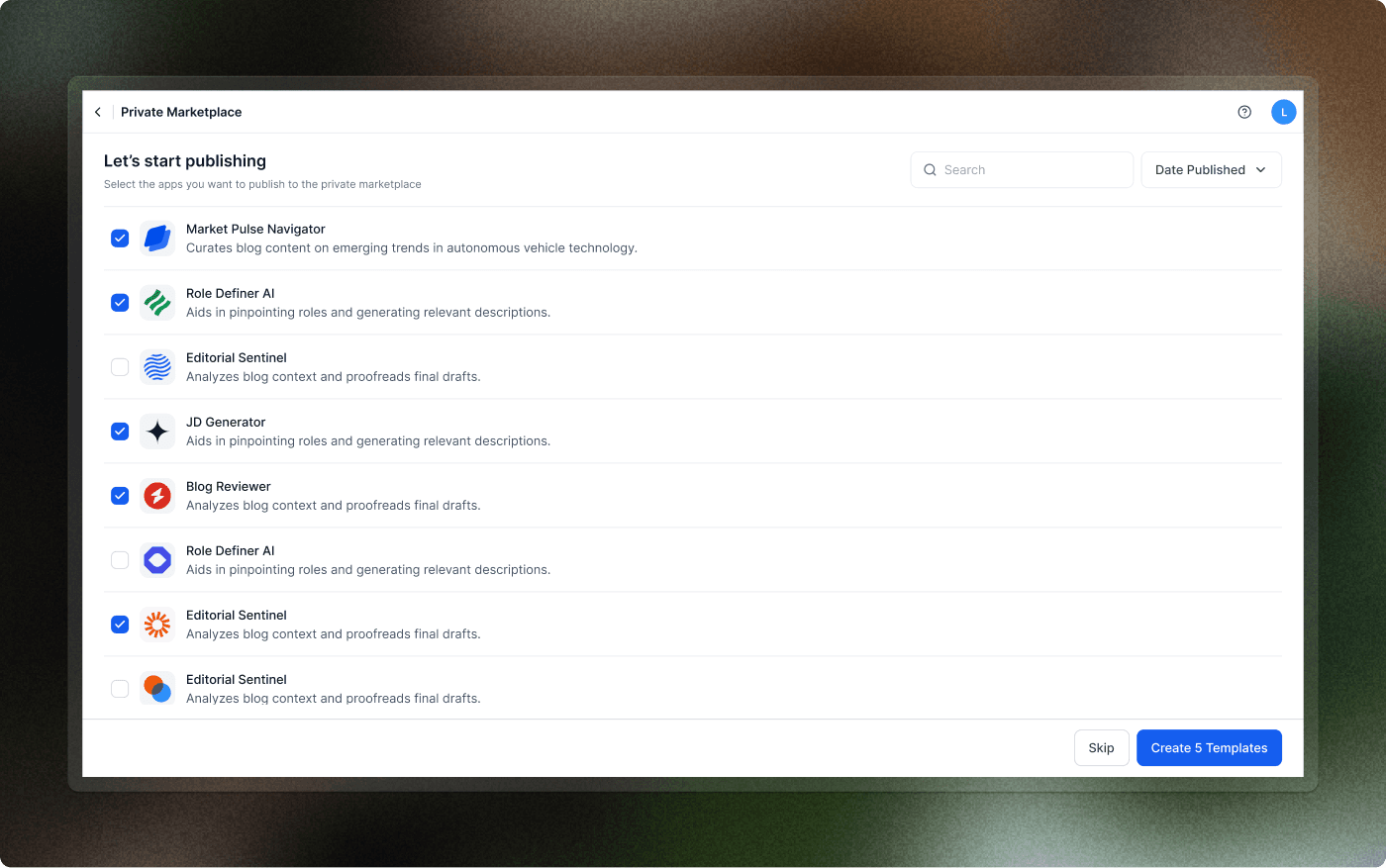
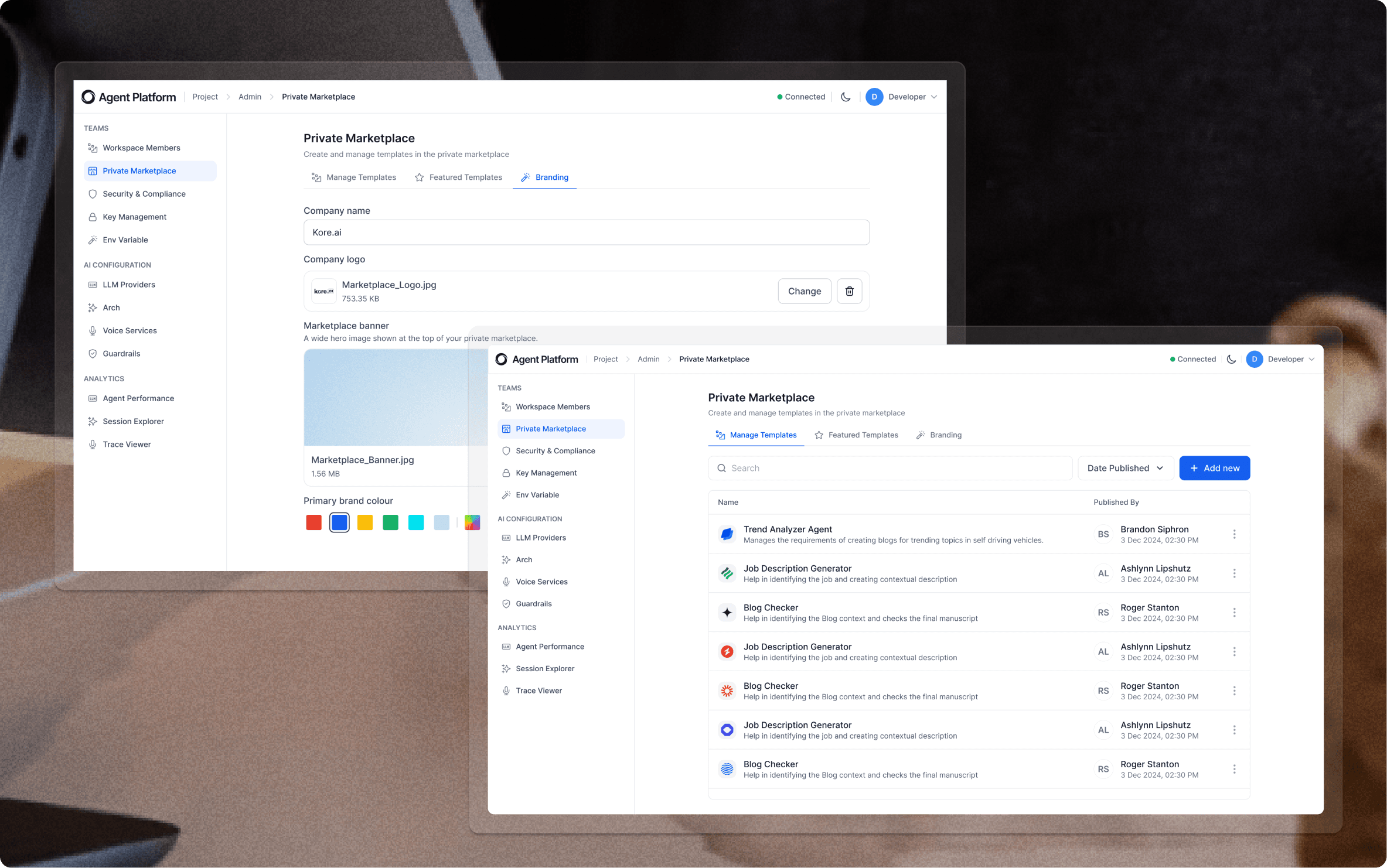
Manage Templates — publish, unpublish, and version internal agent templates
Featured Templates — curate a spotlight row for high-priority internal agents
Branding — company name, logo, banner, and primary brand color to make it feel native
Security & Compliance controls sit in the same admin sidebar as the public marketplace settings
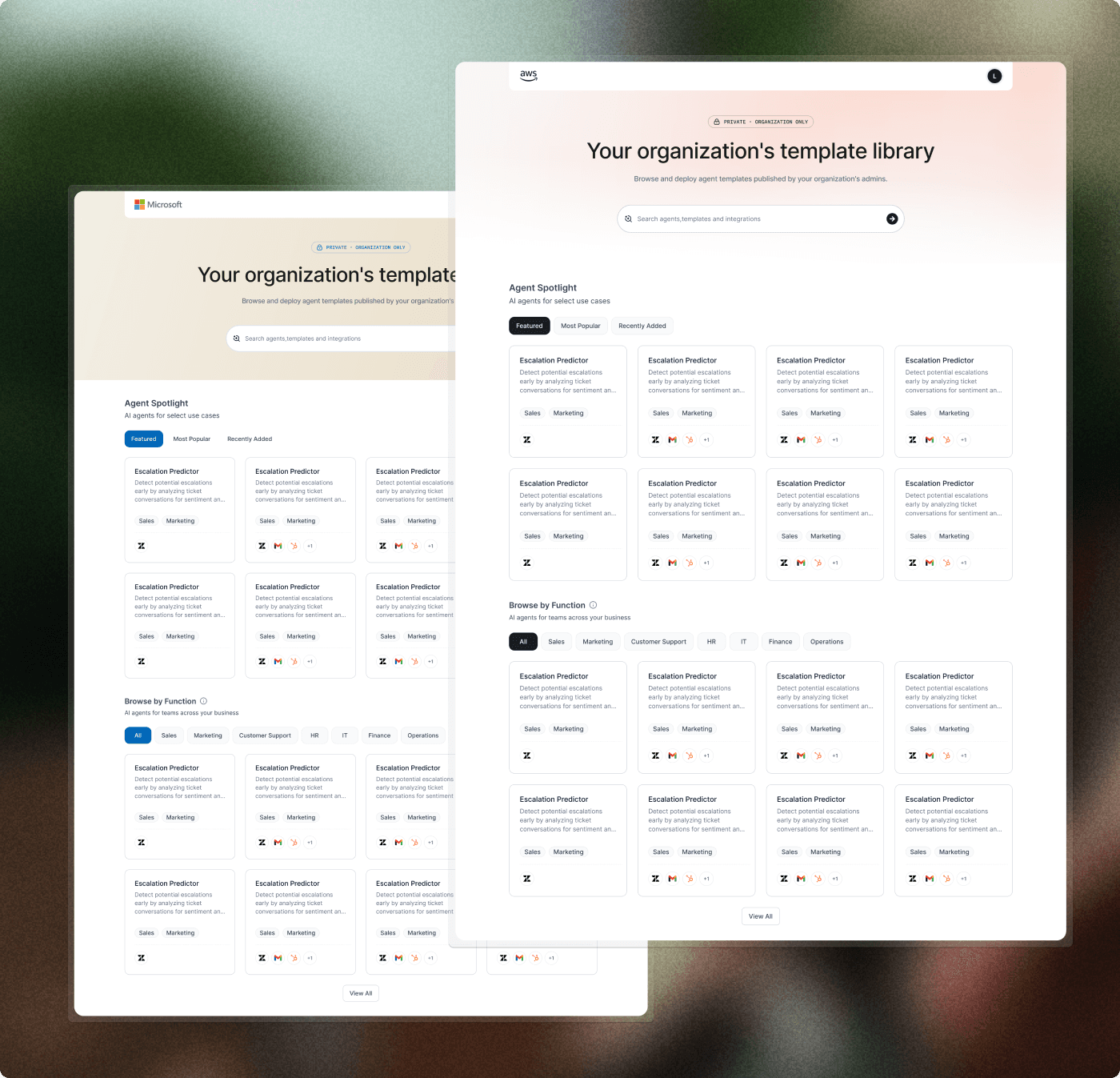
Custom Landing page
The custom landing page let enterprise customers turn the marketplace into a branded internal AI catalog. Instead of sending employees into a generic product surface, companies could present approved agents inside an experience that felt native to their organization.
This helped the marketplace support both motions: public discovery for new customers and governed self-serve adoption inside enterprise accounts.
Design System
Design System
Building the component library as a solo designer — and getting it adopted platform-wide.
Building the component library as a solo designer — and getting it adopted platform-wide.
As the only designer, there was no pre-existing component library to pull from. I built the marketplace design system alongside the product — components were designed, documented, and handed off iteratively as each section of the marketplace was developed.
As the only designer, there was no pre-existing component library to pull from. I built the marketplace design system alongside the product — components were designed, documented, and handed off iteratively as each section of the marketplace was developed.
Agent card — primary and compact variants, skeleton loading states
Category chips — for both browsing and agent card taxonomy
Integration badges — iconographic display of connected business apps
Install progress stepper — three-step flow with validation states
Diagnostic panel — scan results, issue highlighting, resolution prompts
Empty states — tailored messaging for no-results, no-installs, and error conditions
Preview modal — template definition, tool list, and integration requirements
Agent card — primary and compact variants, skeleton loading states
Category chips — for both browsing and agent card taxonomy
Integration badges — iconographic display of connected business apps
Install progress stepper — three-step flow with validation states
Diagnostic panel — scan results, issue highlighting, resolution prompts
Empty states — tailored messaging for no-results, no-installs, and error conditions
Preview modal — template definition, tool list, and integration requirements
After the marketplace shipped, the agent card component system was adopted across the broader Kore.ai platform — surfacing in the Agent Platform dashboard and the XO Platform as a shared design language for displaying agents.
After the marketplace shipped, the agent card component system was adopted across the broader Kore.ai platform — surfacing in the Agent Platform dashboard and the XO Platform as a shared design language for displaying agents.
Impact
Impact
The marketplace became a key PLG surface for Kore.ai’s Agent Platform, helping users move from discovery to preview to deployment through a single solution-led experience.
The marketplace became a key PLG surface for Kore.ai’s Agent Platform, helping users move from discovery to preview to deployment through a single solution-led experience.
For a solo designer working across an entire product surface, the most durable outcome wasn't any single screen — it was the design system. Components built for the marketplace became the foundation for how agents are presented and managed across the Kore.ai ecosystem.
For a solo designer working across an entire product surface, the most durable outcome wasn't any single screen — it was the design system. Components built for the marketplace became the foundation for how agents are presented and managed across the Kore.ai ecosystem.
The install flow collapsed multi-day developer configuration into a guided 15-minute experience for non-technical users
Enterprise teams across Fortune 500 accounts could self-serve agent deployment for the first time — without opening a support ticket
The agent card component system was adopted platform-wide, creating a unified visual language across Kore.ai products
Evaluation confidence increased measurably — the template preview and integration transparency surfaced pre-install resolved the primary drop-off point identified in research
The install flow collapsed multi-day developer configuration into a guided 15-minute experience for non-technical users
Enterprise teams across Fortune 500 accounts could self-serve agent deployment for the first time — without opening a support ticket
The agent card component system was adopted platform-wide, creating a unified visual language across Kore.ai products
Evaluation confidence increased measurably — the template preview and integration transparency surfaced pre-install resolved the primary drop-off point identified in research
Reflection
Reflection
What worked, what was hard, and where the marketplace goes next.
What worked, what was hard, and where the marketplace goes next.
What worked
The confidence-before-commitment framing — surfacing integration requirements early dramatically reduced install drop-off
Progressive complexity — one interface that served both business users and solution architects without compromising either
Treating the agent card as an atomic unit — it scaled from the marketplace grid to platform-wide adoption
The confidence-before-commitment framing — surfacing integration requirements early dramatically reduced install drop-off
Progressive complexity — one interface that served both business users and solution architects without compromising either
Treating the agent card as an atomic unit — it scaled from the marketplace grid to platform-wide adoption
Design challenges
Designing for four distinct personas with one interface — every edge case pulled in a different direction
Working without a pre-existing design system meant building and shipping simultaneously
Enterprise UX constraints (compliance language, permission scoping) often conflicted with simplicity goals
No user testing budget — insights came from internal stakeholders and indirect session data
Designing for four distinct personas with one interface — every edge case pulled in a different direction
Working without a pre-existing design system meant building and shipping simultaneously
Enterprise UX constraints (compliance language, permission scoping) often conflicted with simplicity goals
No user testing budget — insights came from internal stakeholders and indirect session data
Future directions
Personalized recommendations — surface agents based on installed tools and team context
Agent performance previews — show real-world usage patterns before install
Community-contributed templates — open the marketplace to verified third-party agents
Agent health dashboard — post-install monitoring accessible directly from the marketplace
Personalized recommendations — surface agents based on installed tools and team context
Agent performance previews — show real-world usage patterns before install
Community-contributed templates — open the marketplace to verified third-party agents
Agent health dashboard — post-install monitoring accessible directly from the marketplace
What I Learned
What I Learned
Designing a PLG journey for enterprise AI taught me how much trust-building has to happen before a user ever clicks install.
Designing a PLG journey for enterprise AI taught me how much trust-building has to happen before a user ever clicks install.
Trust is the core design constraint in enterprise AI — users won't install what they don't understand, no matter how capable it is
Being solo forces you to build systems, not screens — every component has to earn its place by scaling across the product
The most important design work often happens before any pixels: the framing, the persona clarity, the hierarchy of problems
Progressive complexity is a design philosophy, not a feature — it has to be built into the structure from the start, not layered on top
Trust is the core design constraint in enterprise AI — users won't install what they don't understand, no matter how capable it is
Being solo forces you to build systems, not screens — every component has to earn its place by scaling across the product
The most important design work often happens before any pixels: the framing, the persona clarity, the hierarchy of problems
Progressive complexity is a design philosophy, not a feature — it has to be built into the structure from the start, not layered on top
The Kore.ai Agent Marketplace is where I learned that in enterprise software, the job of design isn't to make things look good — it's to make complex things feel inevitable. When the design is working, users don't notice it. They just get their agent deployed.
The Kore.ai Agent Marketplace is where I learned that in enterprise software, the job of design isn't to make things look good — it's to make complex things feel inevitable. When the design is working, users don't notice it. They just get their agent deployed.

Have a product idea that needs clarity?
Let's talk.
☺ 2026 Laheesh
Currently based in India
Have a product idea that needs clarity?
Let's talk.
☺ 2026 Laheesh
Currently based in India